Context
Tools
Category: AI-First Product Design / Mobile UX / Design Systems
Scope: Product Strategy, Heuristic Audit, UX Architecture, Interaction Design, Design System, Interactive Prototype
Type: Self-initiated concept — conceived, designed and built by me
Year: 2026
One – AI Enhanced Tasks and Reminders
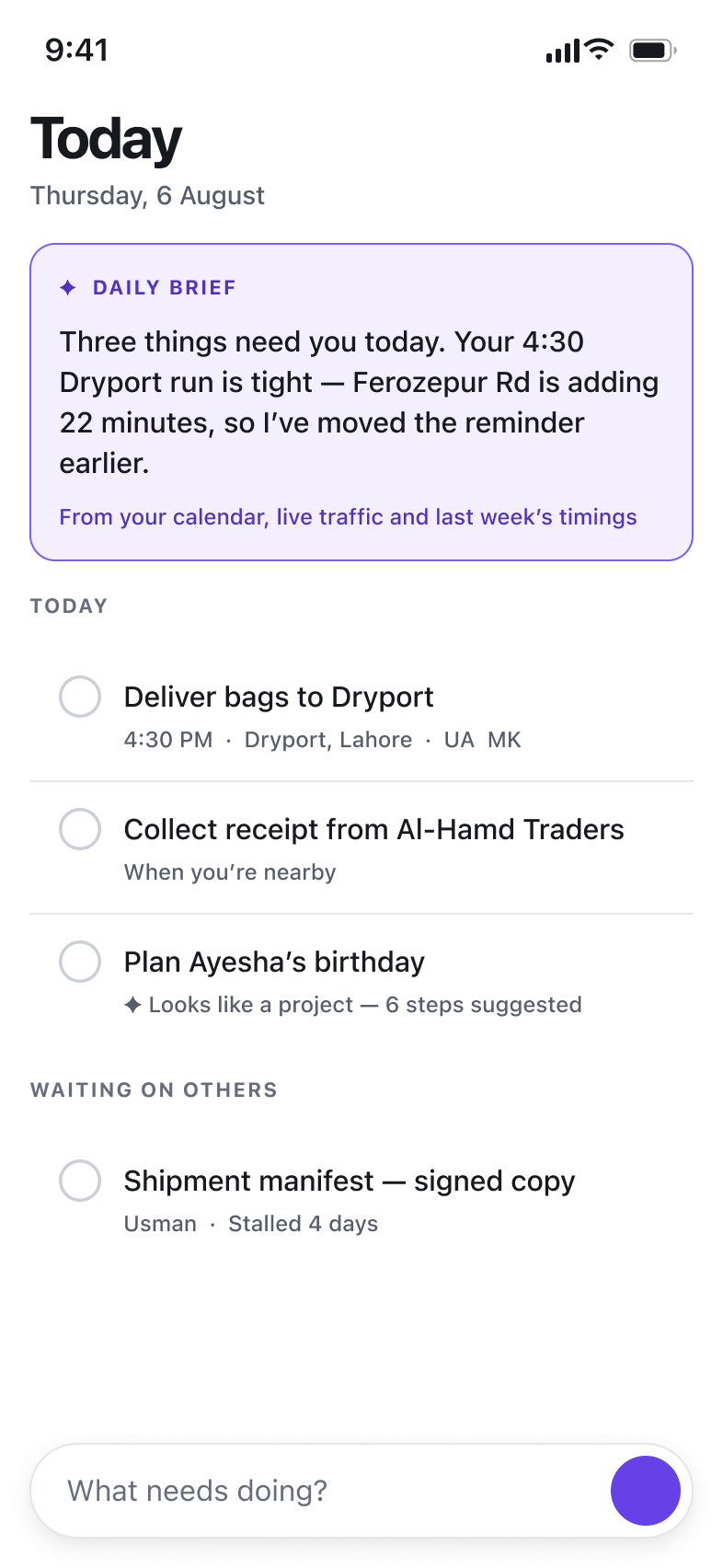
One is an AI-first reimagining of a task and reminder app — a concept I conceived, designed and prototyped end to end.
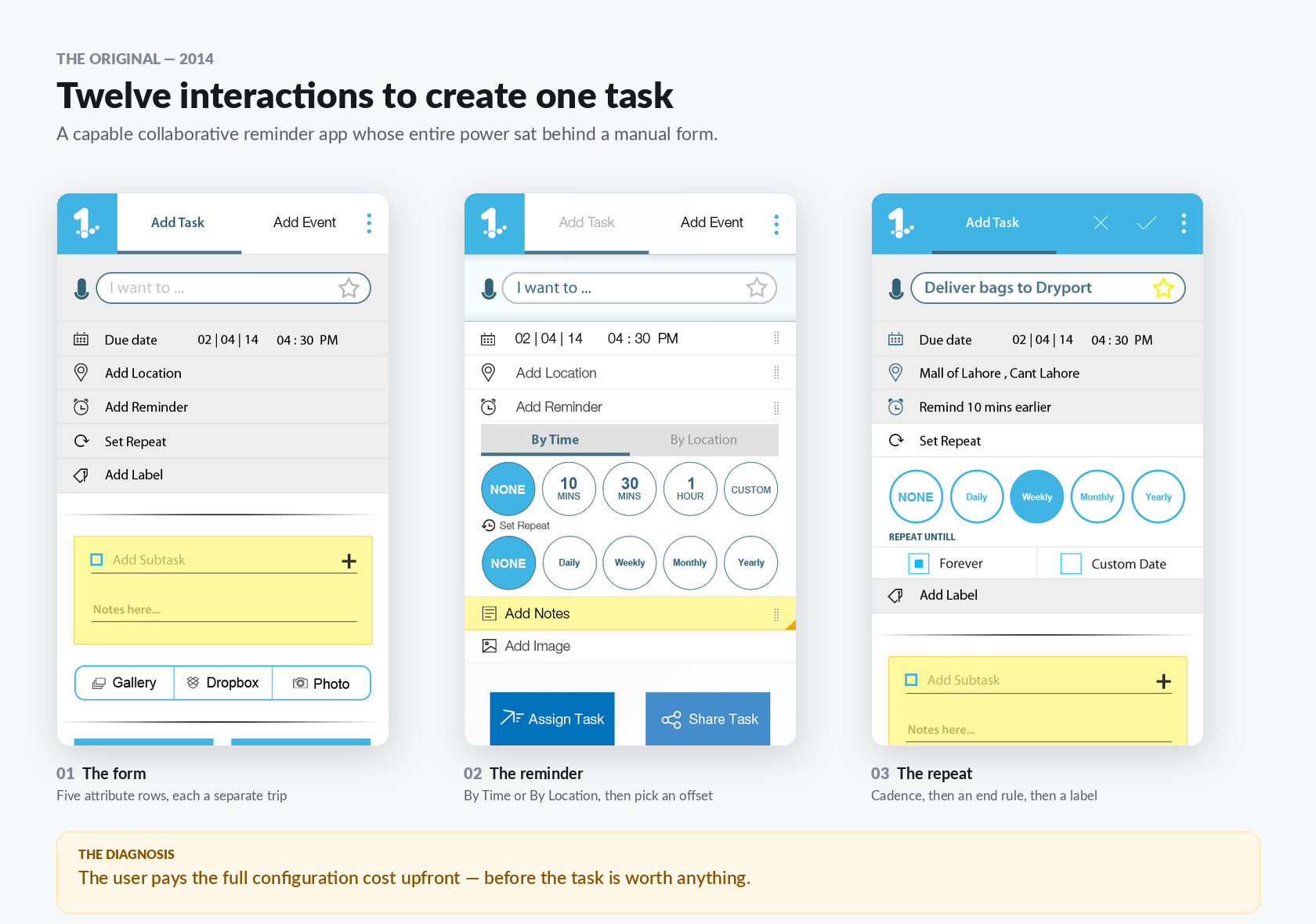
The starting point was a real artefact: 46 UX screens from an unreleased 2014 Android task app. It had ideas well ahead of its time — geofenced reminders that fired when you arrived at or left a place, and multi-person task assignment with per-person accept status. Every one of them sat behind a form that cost twelve interactions to fill.
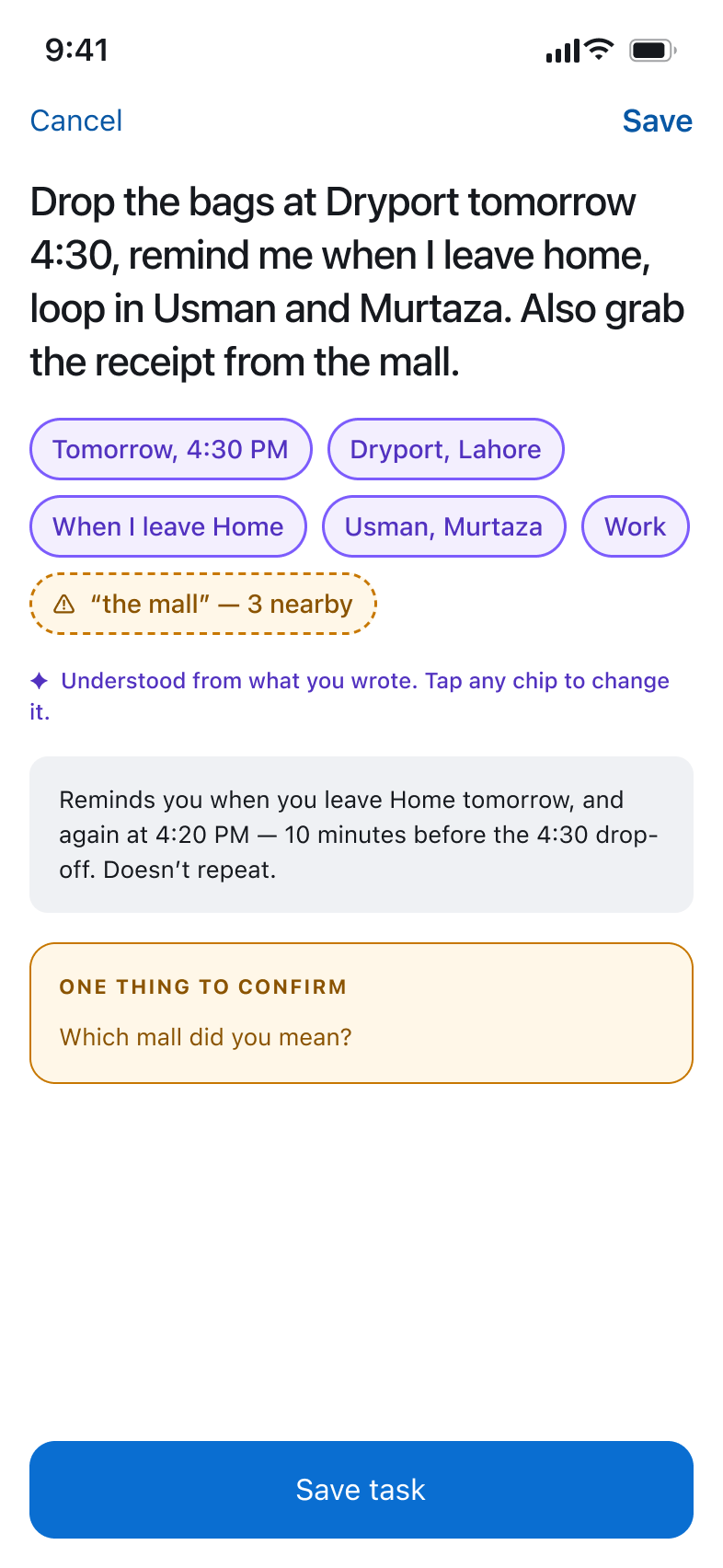
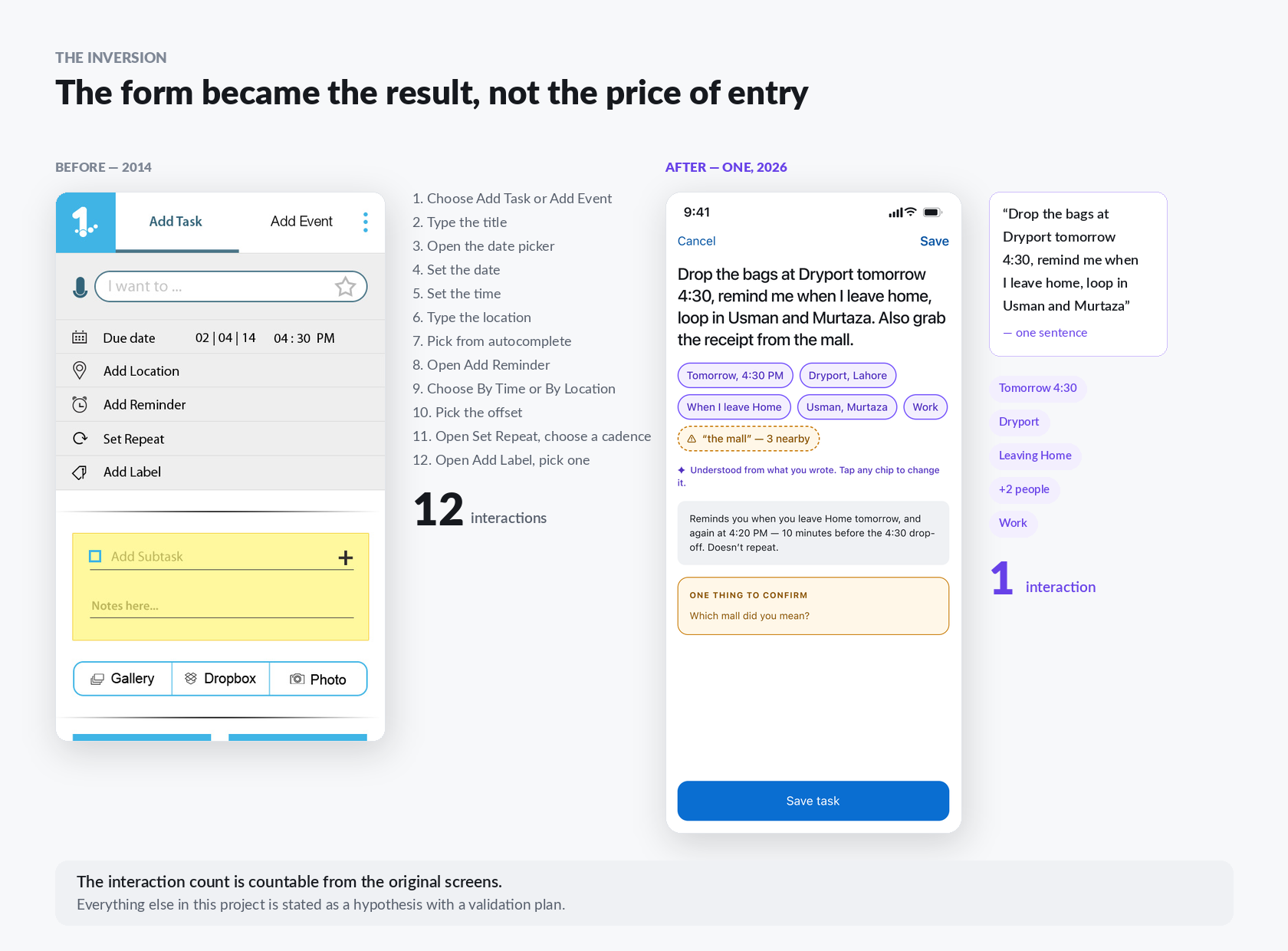
I rebuilt it around a single inversion: the user states their intent, the app proposes the structure, and the user confirms or corrects it. The form does not disappear — it becomes the result of understanding rather than the price of entry.
The Challenge
I audited the original app and found twelve usability failures. Four of them shaped everything that followed:
- The configuration tax. Twelve discrete interactions to create one fully-specified task. To-do apps live or die on capture friction — every second between “I should remember this” and “it’s captured” is a chance the thought is lost.
- Voice was dictation, not comprehension. A microphone sat beside a placeholder reading “I want to…” — a phrase that promises intent understanding. It delivered a transcription into a title string. This gap between promise and delivery is exactly what AI closes, and it is the finding the whole project hangs on.
- Taxonomy before intent. “Add Task” vs “Add Event” forced users to classify a thought before expressing it. Nobody thinks “this is an event”. They think “dentist, Thursday”.
- Compound rules were invisible. Set a weekly repeat, a 10-minute offset and a location trigger, and the app never stated what would actually happen. Reminder systems fail on trust, and trust requires the system saying what it is about to do.
My Role
Everything — this was a self-initiated project with no client and no brief:
- Reconstructed the original product from 46 screens with no spec or code
- Ran a heuristic audit and wrote up twelve findings by severity
- Defined the AI-first strategy — three principles and eight features, each anchored to a specific finding
- Built the design system: 34 colour primitives, 19 semantic aliases, a full type ramp, all contrast-tested programmatically
- Designed and wired the interactive prototype in Figma
- Built a responsive HTML prototype as a shareable second surface
- Wrote the case study, the validation plan and the design documentation
The AI-First Principles
Intent Over Input
One sentence replaces a twelve-step form
“Drop the bags at Dryport tomorrow 4:30, remind me when I leave home, loop in Usman and Murtaza”
Resolves live into date, place, reminder, assignees and label — every one a tappable, editable chip
The Add Task / Add Event split disappears entirely; the system infers it
Confidence as a Material
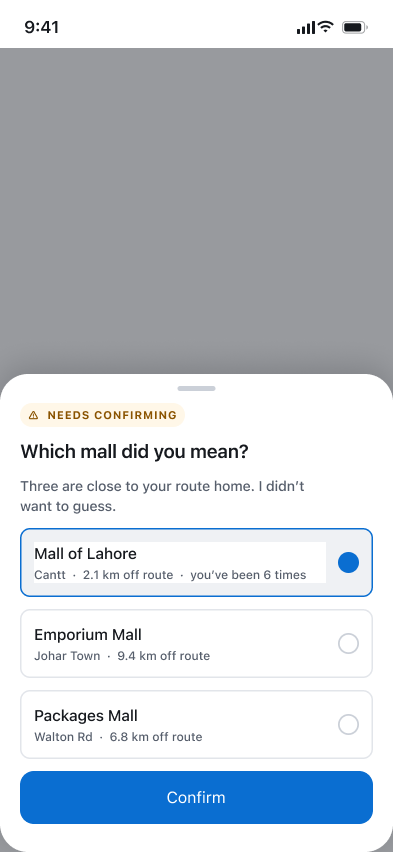
The system is allowed to be unsure — never silently wrong
High-confidence parses render solid; low-confidence render dashed and amber
Ambiguity opens a compact three-option sheet, not a conversation
Confidence is encoded in border style as well as colour, so it survives greyscale and colour-blindness
The Reality Check
Most task apps let users lie to themselves. This one refuses
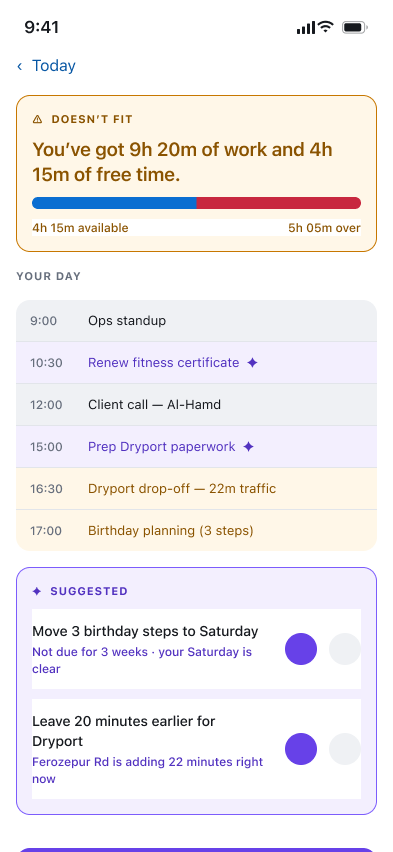
When the day holds nine hours of work and four hours of free time, the app says so
Shows the arithmetic and offers to move the least urgent items
Proposes and waits — silently reorganising someone’s commitments is how you lose them
Never Load-Bearing
AI-first is not AI-only
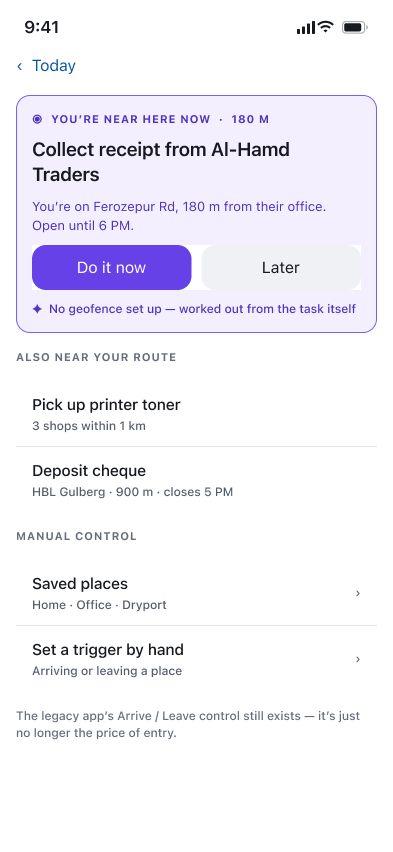
Every AI path has a manual equivalent one tap away
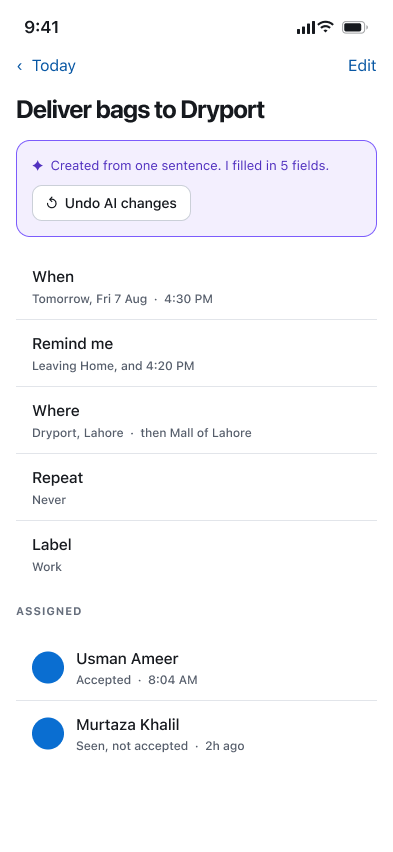
Every inference carries a provenance line saying where it came from
Autonomy is capped at “Suggest” — there is no act-on-my-behalf mode, and the UI says so
The Outcome
A complete, working concept: a wired Figma prototype, a responsive HTML build, and a documented design system. The headline number is the one I can actually prove — twelve interactions reduced to one, countable directly from the original screens.
- Task capture collapsed from 12 interactions to a single sentence
- Voice finally delivers on the original app’s “I want to…” promise
- Every AI inference is visible, attributed and reversible in one tap
- Geofenced reminders kept from the 2014 design — freed from manual setup
- Design system contrast-tested programmatically: zero WCAG AA failures
- 11 screens wired as a clickable prototype; 17 in the HTML build